 Forum
Forum
 Aktif konular
 Üyeler
 Kurallar
 Arama
Arama Tahribat.com Forumları
  Microsoft Windows Ailesi İşletim Sistemleri
  Bilgisayarı Kapatırken Sürekli Çıkan Hata
 Bilgisayarı Kapatırken Sürekli Çıkan Hata
-
Arkadaşlar bilgisayarımı kapatırken şu hata sürekli çıkıyor.
yabancı kaynakları araştırdım ama kesin bir sonuç çıkaramadım.
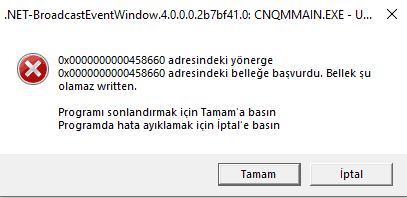
Sistem hata kayıtları
Uygulama: CNQMMAIN.EXE
Framework Sürümü: v4.0.30319
Açıklama: İşlenmeyen bir özel durum nedeniyle işlem sonlandırıldı.
Özel Durum Bilgisi: özel durum kodu c0000005, özel durum adresi 00458660
Yığın:
konum: Microsoft.Win32.UnsafeNativeMethods.DefWindowProc(IntPtr, Int32, IntPtr, IntPtr)
konum: Microsoft.Win32.SystemEvents.WindowProc(IntPtr, Int32, IntPtr, IntPtr)
konum: MS.Win32.UnsafeNativeMethods.IntGetMessageW(System.Windows.Interop.MSG ByRef, System.Runtime.InteropServices.HandleRef, Int32, Int32)
konum: MS.Win32.UnsafeNativeMethods.GetMessageW(System.Windows.Interop.MSG ByRef, System.Runtime.InteropServices.HandleRef, Int32, Int32)
konum: System.Windows.Threading.Dispatcher.GetMessage(System.Windows.Interop.MSG ByRef, IntPtr, Int32, Int32)
konum: System.Windows.Threading.Dispatcher.PushFrameImpl(System.Windows.Threading.DispatcherFrame)
konum: System.Windows.Threading.Dispatcher.PushFrame(System.Windows.Threading.DispatcherFrame)
konum: System.Windows.Application.RunDispatcher(System.Object)
konum: System.Windows.Application.RunInternal(System.Windows.Window)
konum: System.Windows.Application.Run(System.Windows.Window)
konum: Canon.QuickMenu.Main.App.Main()
Günlük Adı: Application
Kaynak: .NET Runtime
Tarih: 27.03.2021 21:36:16
Olay Kimliği: 1026
Görev Kategorisi:Yok
Düzey: Hata
Anahtar sözcükler:Klasik
Kullanıcı: Yok
Bilgisayar: DESKTOP-TKUMVOA
Açıklama:
Uygulama: CNQMMAIN.EXE
Framework Sürümü: v4.0.30319
Açıklama: İşlenmeyen bir özel durum nedeniyle işlem sonlandırıldı.
Özel Durum Bilgisi: özel durum kodu c0000005, özel durum adresi 00458660
Yığın:
konum: Microsoft.Win32.UnsafeNativeMethods.DefWindowProc(IntPtr, Int32, IntPtr, IntPtr)
konum: Microsoft.Win32.SystemEvents.WindowProc(IntPtr, Int32, IntPtr, IntPtr)
konum: MS.Win32.UnsafeNativeMethods.IntGetMessageW(System.Windows.Interop.MSG ByRef, System.Runtime.InteropServices.HandleRef, Int32, Int32)
konum: MS.Win32.UnsafeNativeMethods.GetMessageW(System.Windows.Interop.MSG ByRef, System.Runtime.InteropServices.HandleRef, Int32, Int32)
konum: System.Windows.Threading.Dispatcher.GetMessage(System.Windows.Interop.MSG ByRef, IntPtr, Int32, Int32)
konum: System.Windows.Threading.Dispatcher.PushFrameImpl(System.Windows.Threading.DispatcherFrame)
konum: System.Windows.Threading.Dispatcher.PushFrame(System.Windows.Threading.DispatcherFrame)
konum: System.Windows.Application.RunDispatcher(System.Object)
konum: System.Windows.Application.RunInternal(System.Windows.Window)
konum: System.Windows.Application.Run(System.Windows.Window)
konum: Canon.QuickMenu.Main.App.Main()
Olay Xml'si:
<Event xmlns="http://schemas.microsoft.com/win/2004/08/events/event">
<System>
<Provider Name=".NET Runtime" />
<EventID Qualifiers="0">1026</EventID>
<Version>0</Version>
<Level>2</Level>
<Task>0</Task>
<Opcode>0</Opcode>
<Keywords>0x80000000000000</Keywords>
<TimeCreated SystemTime="2021-03-27T18:36:16.9358608Z" />
<EventRecordID>16604</EventRecordID>
<Correlation />
<Execution ProcessID="0" ThreadID="0" />
<Channel>Application</Channel>
<Computer>DESKTOP-TKUMVOA</Computer>
<Security />
</System>
<EventData>
<Data>Uygulama: CNQMMAIN.EXE
Framework Sürümü: v4.0.30319
Açıklama: İşlenmeyen bir özel durum nedeniyle işlem sonlandırıldı.
Özel Durum Bilgisi: özel durum kodu c0000005, özel durum adresi 00458660
Yığın:
konum: Microsoft.Win32.UnsafeNativeMethods.DefWindowProc(IntPtr, Int32, IntPtr, IntPtr)
konum: Microsoft.Win32.SystemEvents.WindowProc(IntPtr, Int32, IntPtr, IntPtr)
konum: MS.Win32.UnsafeNativeMethods.IntGetMessageW(System.Windows.Interop.MSG ByRef, System.Runtime.InteropServices.HandleRef, Int32, Int32)
konum: MS.Win32.UnsafeNativeMethods.GetMessageW(System.Windows.Interop.MSG ByRef, System.Runtime.InteropServices.HandleRef, Int32, Int32)
konum: System.Windows.Threading.Dispatcher.GetMessage(System.Windows.Interop.MSG ByRef, IntPtr, Int32, Int32)
konum: System.Windows.Threading.Dispatcher.PushFrameImpl(System.Windows.Threading.DispatcherFrame)
konum: System.Windows.Threading.Dispatcher.PushFrame(System.Windows.Threading.DispatcherFrame)
konum: System.Windows.Application.RunDispatcher(System.Object)
konum: System.Windows.Application.RunInternal(System.Windows.Window)
konum: System.Windows.Application.Run(System.Windows.Window)
konum: Canon.QuickMenu.Main.App.Main()
</Data>
</EventData>
</Event>
-
ram
-
Canon yazılımını silip yeniden yüklemeyi dene.
Özellikle canon quick menü yazılımının silindiğinden emin ol.
Tekrar kurarsan özelleşmiş kurulum yap ve canon quick menuyü kurulum listesinden çıkar.
-
CNQMMAIN.EXE : Canon Quick Menu yazılımı ilgili problem, windows sorunu değil. Mühtemelen canon marka bir donanım kullanıyorsun.
Programı ekle/kaldırdan kaldır ve sitesinden en güncel sürümünü tekrar yükle. Ayrıca canon support'a bakabilirsin;
cukurova tarafından 27/Mar/21 21:58 tarihinde düzenlenmiştir -
Görev yöneticisinden Canon yazılımını başlangıçte başlatmayı seçince düzelmiştir sorun teşekkürler.
 Kısayol
 Şikayet
 Özel Mesaj

 Alıntı yap



 Cevapla